

Run your whole business on one ERP. Pay nothing per user.
- $0 license fees – unlimited users, every module included
- Fixed-price implementation, agreed before we start
- Smooth migration from QuickBooks, Sage, NetSuite or spreadsheets
100+
projects for clients in 12+ countries
ISO 27001 & 9001
certified delivery and security
What is ERPNext?
ERPNext is an open-source Enterprise Resource Planning (ERP) system. This system integrates different business functions (Finance, HR, Inventory, Manufacturing, Customer Relationship Management, Projects, Sales and Purchase) and provides teams with a unified real-time view of the business.
ERPNext replaces fragmented, disconnected business applications with a unified system that links transactions end-to-end. For example, in ERPNext, a sales order can automatically reserve inventory and a delivery can update inventory and generate an invoice, which upon payment closes the transaction.
The Frappe Framework allows ERPNext to be heavily customized by extending it with new fields, forms, workflows and apps.

No per-user license fees – ever
With ERPNext, there are no user-license fees. You pay only for implementation services you choose and the cloud you host on. That means the whole organization can use the ERP, not just a licensed few.

Free and easy to modify
With ERPNext, you can extend the system with new features, and keep them upgrade-safe.

Self-host on the server of your choice
With ERPNext, you can host on the server of your choice. That includes managed Frappe Cloud, AWS, Azure, Google Cloud, VPS, your data center and more.

ERP chatbot built in
Customers and employees can check the status of their orders, invoices, and leave requests using chat. The chatbot lets employees to query the ERP in a natural language.

Mobile apps for every team
Real time sync mobile apps for field sales and service teams, attendance and warehouse with ERPNext.
Signs your business has outgrown spreadsheets and basic accounting software

Month-end close takes days of reconciling spreadsheets

Stock on the system never matches stock on the shelf

Sales, inventory and accounts are in different systems

Management can’t get real-time numbers without asking someone

Per user license costs stops you from providing the whole team access

Approvals happen over emails and text messages, with no audit trail
End-to-end ERPNext, from first workshop to long-term support
Implementation & configuration
Our experts will work with your team to define and configure your business processes based on your unique needs.
Customization & app development
Data migration
Integrations
Mobile apps
Support & dedicated experts
Everything your business runs on, in one system
See what a module does, the documents your team will use and who relies on it day to day.
A complete double-entry accounting system with a closed-loop integration to all other modules to ensure your books are always up to date.
- Define a chart of accounts and general ledger
- Support multi-currency and multi-company
- Budgets and cost centers
- Receivables and payables
- Aging receivables and payables
- Bank reconciliation
- Financial statements and tax reports
Manage the full sales cycle from quotation to order, with pricing rules, discounts and sales-team performance built in.
- Quotations and sales orders
- Customer credit limits
- Sales commissions
- Price lists and pricing rules
- Territories and sales partners
- Sales analytics
Control purchasing from internal requests to supplier payment, comparing quotes and tracking every order.
- Material requests
- Supplier quotation comparison
- Supplier scorecards
- Requests for quotation
- Purchase orders
- Purchase analytics
Real-time inventory across any number of warehouses, with accurate valuation that flows straight into accounting.
- Multi-warehouse inventory
- FIFO and moving-average valuation
- Landed cost allocation
- Batch and serial number tracking
- Reorder levels and auto material requests
- Stock reconciliation
Plan, run, and cost production from bills of materials to the shop floor integrated with stock and sales demand.
- Multi-level bills of materials
- Work orders and job cards
- Subcontracting
- Production planning
- Workstations and operations
- Production costing
Leads, opportunities, quotations, and customers all within the ERP.
- Leads and opportunities
- Campaigns and email
- Convert opportunity to quotation
- Sales pipeline stages
- Appointments and follow-ups
- Pipeline reports
Plan projects, track time and costs, and bill clients directly from the work done.
- Projects and tasks
- Timesheets
- Project costing and profitability
- Gantt view and dependencies
- Billing from timesheets
- Customer portal access
Frappe HR covers the whole employee lifecycle – from hiring to payroll – free and fully integrated with accounts.
- Employee records and onboarding
- Expense claims and advances
- Appraisals and goals
- Attendance, shifts and leave
- Salary structures and payroll
- Employee self-service
Keep a full register of fixed assets with automatic depreciation and maintenance tracking.
- Asset register
- Asset movement between locations
- Repairs and value adjustments
- Depreciation schedules
- Maintenance schedules
- Asset reports
Build quality checks into receiving and production, and handle customer issues against service levels.
- Quality inspections
- Non-conformance tracking
- Service level agreements
- Quality goals and procedures
- Customer issues and tickets
- Warranty claims
Sell in-store and online from the same item master, stock and accounts.
- Point of sale with POS profiles
- Web shop and shopping cart
- Customer portal
- Loyalty programs
- Website and blog builder
- Payment gateway integration
One connected flow from the first enquiry to the final payment
Lead
Capture a lead from an enquiry via the web, email or a marketing campaign.
Opportunity
Assess and record the lead's requirements.
Quotation
Price the lead using an internal price list or a pricing rule.
Sales Order
Obtain customer's order and confirm stock reservation.
Delivery Note
Ship goods and update inventory.
Sales Invoice
Post revenue and tax to the ledger.
Payment Entry
Match the payment to the invoice and close it.
Material Request
A team requests items, or reorder levels trigger it.
Request for Quotation
Sent to several suppliers at once.
Supplier Quotation
Responses are compared side by side.
Purchase Order
The best offer is approved and ordered.
Purchase Receipt
Goods are received, inspected and stocked.
Purchase Invoice
The bill is matched to the order and receipt.
Payment Entry
The supplier is paid and payables update.
Sales Order
Demand comes in from customers or forecasts.
Production Plan
Requirements are worked out from the BOMs.
Material Request
Shortfalls in raw materials are raised.
Work Order
Production is released to the shop floor.
Job Card
Operators log time and output per operation.
Stock Entry
Finished goods enter stock at actual cost.
Delivery Note
Products ship against the original order.
The building blocks
Documents are Everything
Customers, items, invoices, employees, and more are all DocTypes. They are structured records with custom fields, relationships, and history.
Workflows & approvals
Define states, and the conditions for transition.
Roles & permissions
Reports & dashboards
Automate your business processes
Connect your systems
Talk to your ERP like you talk to a colleague
- Securely connects to ERPNext through its REST API
- Respects ERPNext roles and permissions
- Various AI models available, including a privately hosted model
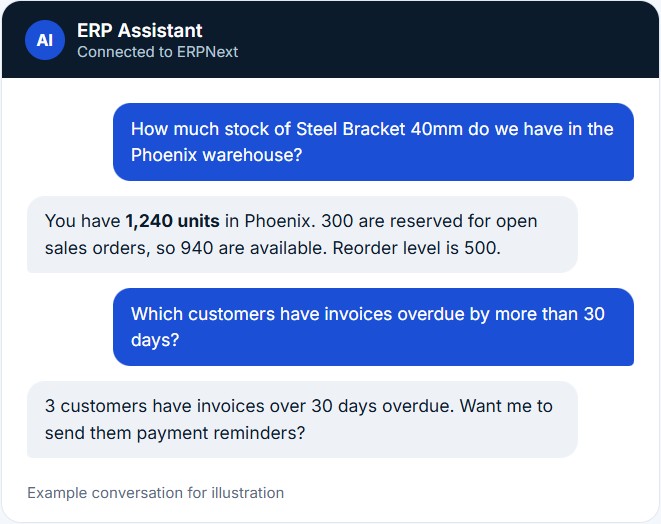
Ask your ERP anything
Customer service bot
Sales assistant
HR helpdesk
Smart document capture
Insights and alerts
Put ERPNext in every pocket
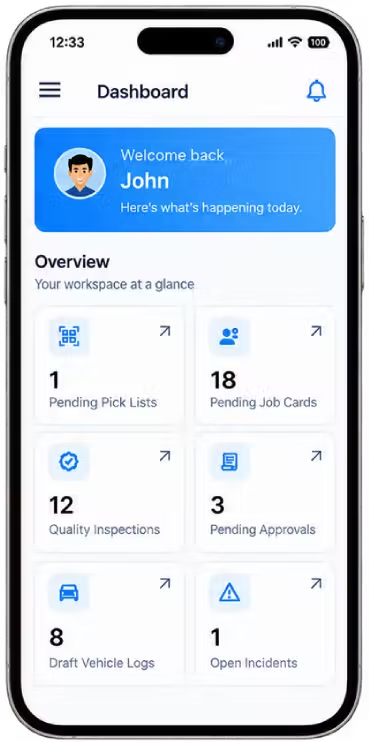
ERPNext Go
Our app on Google Play: allows employees to do pick & pack, gate-entry and scanning audits for quality and job card inspections, as well as report incidents.
Field sales
Field service
Attendance & HR
Warehouse & manufacturing
Customer & dealer portal
A better alternative to Odoo, QuickBooks and Dynamics
ERPNext is free and open source. Adding the 50th user costs the same as the 5th, nothing in licenses.
Accounting, Inventory, Manufacturing, HR and Payroll, CRM, Projects, POS and website, all in one platform.
With GPLv3 license and full source code, there is no vendor lock-in. You are free to export your data any time you want.
Frappe Cloud, AWS, Azure, Google Cloud or your own servers. You choose where to host it based on price, compliance, or data residency.
You can change the product to suit your needs using the Frappe Framework.
Ready to use for businesses operating in USA with US Dollars and other currencies, Templates for USA state sales tax, Bank feeds and Multi company.
Compare modules with Odoo, QuickBooks and Dynamics 365
- Included natively
- Limited, higher tier or add-on
- Not available
| Capability | ERPNext | Odoo Enterprise | QuickBooks Online | Dynamics 365 BC |
|---|---|---|---|---|
| Licence model | Open source, $0 licence | Paid per user (free Community edition is limited) | Flat monthly plan with user caps | Paid per user |
| Software list price | Hosting only, from ~$50/mo | ~$49 / user / month (Custom) | $38 – $340 / month | $80 – $110 / user / month |
| User limit | Unlimited | Unlimited (each paid) | 25 users max (Advanced) | Unlimited (each paid) |
| Accounting & finance | Included | Included | Included | Included |
| Inventory & warehousing | Multi-warehouse, batch & serial | Included | Basic, Plus plan and above | Included |
| Manufacturing | BOM, work orders, planning | Included | Not available | Premium licence only |
| HR & payroll | Frappe HR, free | Included | Payroll as paid add-on | Third-party add-on |
| CRM | Included | Included | Not available | Basic; full CRM is a separate D365 product |
| Point of sale | Included | Included | Not available | Via partner apps |
| Website & eCommerce | Included | Included | Integrations only | Via connectors (e.g. Shopify) |
| Customization | Full source + low-code | Studio on Custom plan | Settings and apps only | AL developer extensions |
| Self-hosting / on-premise | Yes, any cloud or server | Enterprise on-premise licence | Cloud only | Separate on-premise licensing |
| Source code access | Full (GPLv3) | Community edition only | No | No |
| India GST & e-invoicing | Native via India Compliance app | Indian localization module | QuickBooks Online exited India | Via partner localization |
What people get wrong about open-source ERP
Open source means no support.
ERPNext’s creators provide commercial support as well as a partner network, including Cloud Converge, with SLAs, upgrades and managed hosting.
You can’t run a business with free software.
ERPNext allows for multiple companies and allows for audit trails in multiple currencies and warehouses and is used by manufacturers, distributors and service companies.
Customizations will break upgrades.
Customizations as fields, scripts and apps live outside the core and standard upgrades won’t break.
Being open-source means it is less secure.
There is code level security with document version control, two-step verification and role based permissions and you decide where your data lives.
See what your ERP will really cost
Potential software savings with ERPNext over 3 years
$0
Estimate covers software licences/subscriptions and hosting only, at the price assumptions shown. Implementation, data migration, training and third-party add-ons are excluded and vary by scope. Actual vendor prices and plan features may change. All amounts are shown in USD.
Run ERPNext where it suits you
Frappe Cloud (managed)
- Hosted by the same team that built ERPNext
- Automatic backups and version upgrades
- No servers to manage
Your own cloud
- AWS, Azure, Google Cloud, or any VPS
- Full control over servers, backups and region
- Compatible with your existing cloud solution
On-premise
- Compatible with your existing network and security
- Data never leaves your premises
- No dependency on a third party host
Consider: You manage hardware, backups, power and security.
How different businesses use ERPNext
Manufacturing
Support for multi-level BOMs, work orders, job cards, subcontracting and production planning linked to stock and costing.
Distribution & wholesale
Retail
Services & consulting
Healthcare
Education
Import, Export and Trading
Non-profits
A clear path from legacy systems to go-live
Workshops to document your processes, challenges and your reporting needs.
Design a solution, configure ERPNext for your business processes and secure your data.
Bridge the gaps with tailor-made apps, integrations and reports, and adjust printing formats.
User acceptance testing, role-based training and data migration.
Support, maintenance and upgrades.