


The newest update to the Frappe stack is out, about a month after v16.5.0. Updates now arrive every month and this one isn’t a minor patch. Many of the changes answer requests users have made for a long time: reports that print cleanly, customer records you can read at a glance, and a Projects module you can actually run a project from.
Instead of going through each feature one by one, this post sorts the update by the people who will use it day to day.
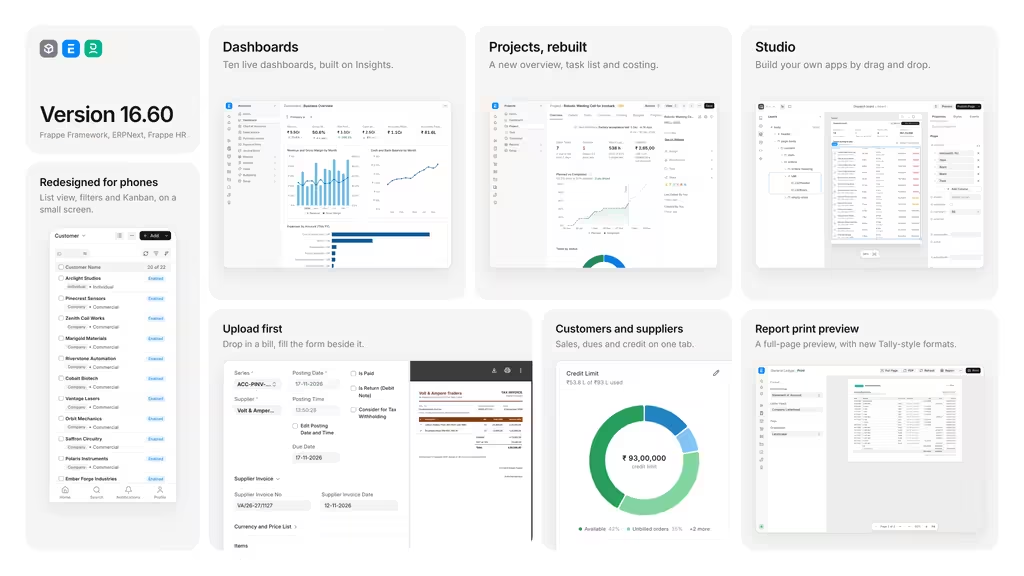
Quick Summary
| Area | What Changed | Who Gains the Most |
| Report printing | Live preview, 10 new standard formats, Day Book report | Accountants, auditors |
| Document upload | Upload files first, then fill in the form side by side | AP teams, HR, finance staff |
| Customer and supplier forms | Overview dashboard, top items tab, item restrictions | Sales, purchase, credit control |
| Projects | Single view for progress, tasks, costs and billing | Project managers, service firms |
| Dashboards | Richer charts, maps, filters and drill-downs | Owners, department heads |
| Mobile | Bottom bar, bottom sheets, infinite scroll, kanban | Field staff, managers on the move |
| Studio | Build apps and pages without code, now part of the core | System admins, implementers |
| Data import | Child table import from Excel with column mapping | Implementation teams |
| Web Forms | Drag-and-drop editor, private links, data requests | HR, admin, operations |
| Flow (alpha) | AI layer that reads data and fills forms within user permissions | Early adopters |
For Finance and Accounts Teams
Reports You Can Print Without Fixing Them First
Printing a report used to mean guessing how it would look on paper. Report printing now has a live preview. When you switch the print format, letterhead or page settings, the preview changes as you go, so you can see the result before you print or export.
ERPNext also adds ten standard print formats. They’re aimed at businesses moving from desktop accounting packages, where these documents are part of daily work:
- Statement of Account, based on the General Ledger
- Bill-wise Pending, for customers and for suppliers
- Balance Confirmation, for customers and for suppliers
- Sales Register and Purchase Register
- Outstanding Sales Orders and Outstanding Purchase Orders
- Warehouse Stock Summary
There’s also a new Day Book report. It lists all transactions for a chosen period in date order, which accountants used to older systems will find familiar.
Upload the Paperwork First, Enter the Data Later
Most accounts teams work from a pile of bills, receipts and claims. ERPNext now fits that habit. You can upload many files at once for documents such as Purchase Invoices or Expense Claims, and they wait in a queue.
When you pick a file from the queue, the screen splits in two. The document is on one side and the blank form is on the other, so you type straight from the source without switching windows. Admins can turn this on for any DocType, not only the accounting ones. In the next release, AI will be able to read the uploaded file and fill in the form for you, so staff only need to check the entries and save.
Customer and Supplier Records That Show the Full Picture
Opening a customer or supplier record now gives you a summary straight away. The new Overview section shows:
- Sales or purchase trends over time
- Recent transactions
- Payments received or made but not yet allocated
- Open orders
- Current account balance
- How much of the credit limit has been used
A new Items tab shows which products you sell to, or buy from, that party most often. Sales and purchase staff can see buying patterns without running a separate report.
Party-specific item rules are now set from the Customer and Supplier forms themselves. Before, they were hard to find. Now that they’re in plain view, it’s easier to stop staff from adding the wrong item, or the same item twice, on a transaction.
For Project Managers
The Projects module is being rebuilt over three months, and this release is the first stage of that work. When you open a project, you now see one screen with:
- Overall progress
- Tasks that are blocked or past their due date
- Cost and billing figures
You can change a task’s priority, owner or status right from the list without opening each task. The Costing tab compares actual spend and billed amounts against the project budget, so you can spot overruns early instead of finding them at month end.
More work on Projects is planned for the December update.
For Owners and Department Heads
Dashboards With More Detail
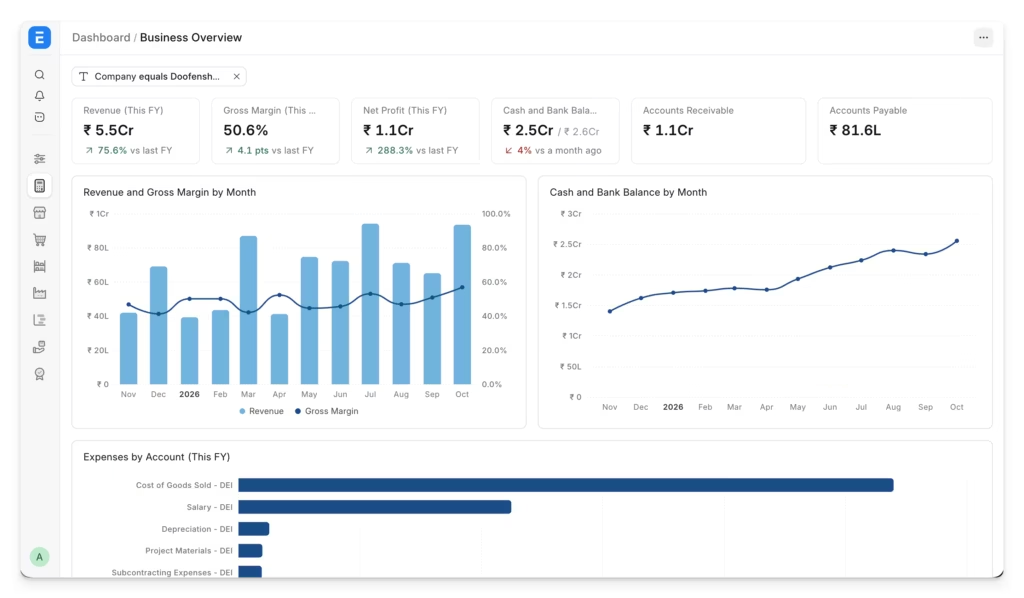
Dashboards now run on Insights, Frappe’s business intelligence app. The update adds:
- Charts with more than one axis
- Maps and heatmaps
- Trend lines
- Tables with colour coding
- Dashboard-level filters, which help groups running several companies on one system
Click a figure and you can drill down to the documents behind it, or split the number by any attribute you choose.
ERPNext and Frappe HR now come with ready-made dashboards and you can add your own charts in a few clicks. Existing dashboards, custom ones included, get a cleaner look from the new chart library.
Note: These dashboards need the Insights app installed on your site.
For Teams Who Work from Their Phones
ERPNext, Frappe HR and the Framework all got mobile changes in this release:
- A bar at the bottom of the screen for search, profile and moving between pages
- Panels that slide up from the bottom, which make filters and menus easier to use with one hand
- Lists that keep loading as you scroll, with no page buttons
- Kanban boards that fit a phone screen
More mobile changes are expected in December.
For Admins and Implementation Partners
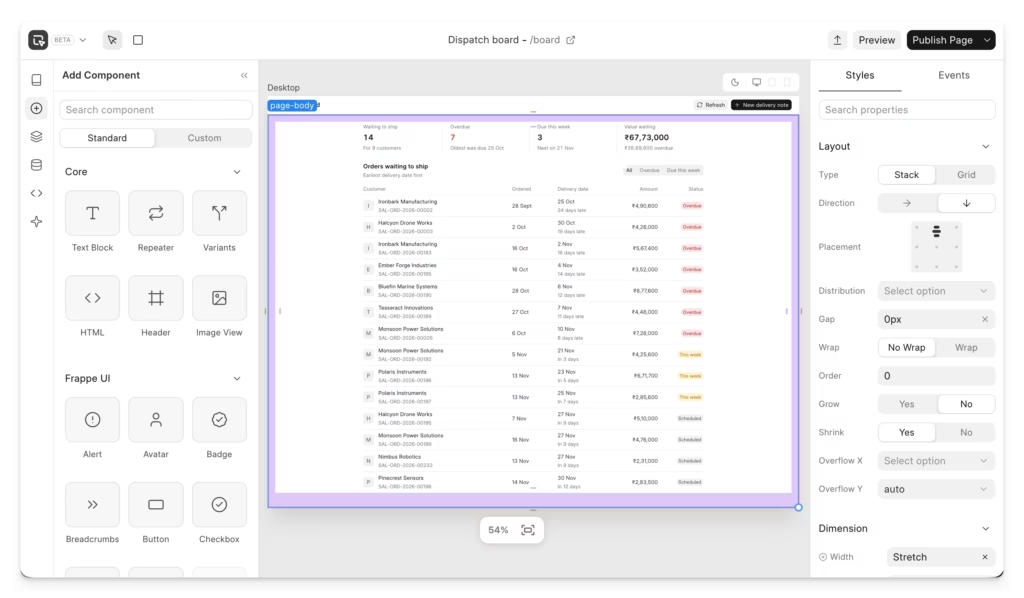
Studio Is Now Part of the Framework
Studio, the no-code builder, is now built into Frappe Framework. You can create full apps and custom pages without writing code, and changes go live as soon as you save. Studio also works with AI agents, including Flow. You can describe an app in plain language and get a working app back. In one example, a full manufacturing app was built from a single written request, ready to adjust and use.
Easier Child Table Imports
Bringing data into child tables used to need a CSV file in an exact layout, and small formatting mistakes broke the import. The new importer accepts Excel and other common formats and lets you match your columns to the right fields. It works the same way as the main data import screen from the previous release, so there’s nothing new to learn.
Web Forms
Building web forms is now much simpler:
- A drag-and-drop editor that works like the DocType editor
- Quicker field selection from the linked DocType
- Private links, so people can fill in a form without an account
- A way to ask others for data from inside a record. For example, HR can send a new joiner a link to fill in their own details.
Flow: The AI Layer (Alpha)
Flow is out as an early alpha. It runs next to your Frappe apps and can look through your data and fill in forms using large language models.
Two points matter for anyone thinking about security:
- Flow can only see and do what the logged-in user is allowed to see and do. It doesn’t get around your role permissions.
- You can use your own AI provider keys. Bundled AI credits on Frappe Cloud are planned for later.
Ready-made Flow skills for ERPNext and Frappe HR will roll out over the coming months.
What’s Coming Next
- A customer and supplier portal built with Studio, expected within a week of this release
- Cheque management, which ERPNext hasn’t had until now
- More updates to ERPNext and Frappe HR in December
Over 2,500 bugs were also fixed in the past month alone.
Before You Upgrade: A Short Checklist
A release this size touches many parts of the system. Before you move a live site to v16.6.0:
- Test on staging first. Restore a recent backup to a test site and run your key workflows there.
- Check custom print formats. With the new print engine, make sure your custom formats and letterheads still look right.
- Install Insights if you want the new dashboards.
- Review role permissions before you try Flow. Since it follows user permissions, any loose access rights will carry over to what it can reach.
- Brief your mobile users on the new layout so the bottom bar and slide-up panels don’t confuse them on day one.
Frequently Asked Questions
Do I need Insights for the new dashboards?
Yes. The dashboard features depend on the Insights app being installed on your site.
Will my existing custom dashboards still work?
Yes. Existing dashboards, custom ones included, keep working and get the updated chart design.
Is the upload-first feature only for invoices?
No. Purchase Invoices and Expense Claims are the obvious uses, but an admin can turn it on for any DocType.
Will ERPNext fill in uploaded documents automatically?
Not yet. AI-based form filling from uploaded files is planned for the next release.
Can Flow see data a user isn’t allowed to access?
No. Flow works within the permissions of the user running it.
Is the Projects update finished?
Not yet. This is the first stage of a three-month rebuild, and more changes are expected in December.