

Organizations today face immense pressure to bring high quality software products quickly and efficiently to market, often adopting agile methodologies and Continuous Integration and Continuous Deployment (CI/CD) practices as part of this initiative. Consulting firms specialize in helping organizations implement and optimize CI/CD pipelines to optimize agility and productivity within development teams.
Agile Development Consulting services specializing in Continuous Integration/Continuous Deployment (CI/CD) aim to streamline the software delivery process by automating various development, testing, and deployment stages. By adopting this practice, organizations can speed up release cycles while decreasing bugs introduced and quickly responding to customer feedback. By adopting CI/CD practices, companies can ensure their software remains relevant to provide customers with value more frequently.
Consultants specializing in continuous integration/deployment (CI/CD) provide organizations with expert guidance and assistance when adopting or refining continuous integration/deployment practices. Working alongside development teams, project managers and other stakeholders, they assess existing development processes for potential improvements, identify any areas for enhancement and design and implement pipelines tailored specifically to an organization’s requirements.
One of the primary objectives of CI/CD Consulting is automating the building, testing, and Deployment of software applications. Consultants assist organizations in choosing appropriate CI/CD tools as well as designing efficient workflows to integrate seamlessly into existing development environments. Automating processes eliminates manual or error prone processes and fosters collaboration and transparency among teams for faster software releases.
Consulting services such as Continuous Integration/Continuous Deployment consulting play an indispensable role in ensuring software systems’ security and stability. Consultants help organizations implement rigorous testing strategies such as unit tests, integration tests, and performance tests to identify potential issues early in development cycles and address them accordingly. They can also set up monitoring/alerting mechanisms allowing teams to proactively detect production incidents early, further increasing overall software quality.
Agile Continuous Delivery Solutions
Agile continuous delivery solutions automate the path from merged code to a release ready build, so every sprint’s work can reach customers the day the business chooses. Builds, tests, security checks and deployments run through one pipeline. Cloud Converge sets these up for growing software and ecommerce firms, then trains their teams to own them.
| Topic | Detail |
| Definition | Continuous delivery is a practice in which every code change is built, tested and staged automatically, leaving the release decision to people rather than to a calendar. |
| Best suited to | UK SaaS, software and online retail businesses with roughly 10 to 250 staff, working in Scrum or Kanban |
| Scope of work | Audit, pipeline design, test automation, infrastructure as code, monitoring and training |
| Ways to engage | Fixed price, dedicated team, agile or hourly |
| Credentials | ISO 27001, ISO 9001:2015, AWS and Microsoft Solutions Partner; 70+ customers across the UK, US, Australia, Canada, the Middle East and India |
| UK reference point | The Government Digital Service asks its teams to merge feature branches within a day or two (GDS Way) |
From commit to customer, in six moves
A developer merges a small change → the pipeline compiles it and runs unit and integration tests → security and quality scans decide whether it may carry on → the build lands on a staging copy of production → someone in the business clicks release (under continuous deployment, nobody needs to) → monitoring watches the live service and rolls back in one step if errors climb.
So What Does a CI/CD Consultant Actually Do?
Think of the consultant as the person who builds the road from a developer’s laptop to your customers, then teaches your team to maintain it.
Two terms get tangled constantly, so it’s worth settling them first. Continuous integration (CI) means everyone merges small changes into one main branch at least daily, and each merge sets off an automatic build and test run. The “CD” half has two meanings:
| Term | What happens once tests pass | Who presses “go” |
| Continuous delivery | The build waits, ready to release | A person in the business |
| Continuous deployment | The build goes live straight away | Nobody; the pipeline does it |
The second rests on the first (Martin Fowler). You can’t automate the final click until everything before it has earned your trust.
A sensible engagement moves from looking, to building, to letting go. The consultant first traces how code really travels today, including the manual steps that live only in someone’s head. A design follows, matched to your stack, whether that runs on AWS, Azure, Google Cloud or your own servers. Then comes the build: branching rules, tests, deployment scripts, infrastructure as code and monitoring. Finally your developers take the wheel while the consultant sits beside them.
Cut that final stage to save money and you’ll probably own a pipeline nobody in house dares to touch.
Three Ways to Ship: Which One Fits a Growing Team?
Picture two companies on the same Friday afternoon. At the first, a release manager is merging six weeks of work while the support desk stands by. At the second, the product owner checks that four small changes have already passed on staging and clicks release before lunch. Neither team is careless. They just ship differently, and for most SMEs the second model, continuous delivery, is the sensible default.
| Calendar releases (traditional) | Continuous delivery | Continuous deployment | |
| Who says “go” | A release manager, on fixed dates | The product owner, whenever the business wants | The pipeline, the moment tests pass |
| What ships at once | Weeks of bundled changes | One or a handful of small changes | A single change |
| How it’s checked | A manual regression phase, often with some automated unit tests | Automated tests on every change, plus targeted exploratory testing | Automated tests alone, so they must catch almost everything |
| Tracing a fault | Slow, since many changes land together | Quicker, since each release is small | Quickest per change, if monitoring is mature |
| Cost to set up | Little tooling, but heavy manual effort every release | Moderate: pipeline, test automation, staging | Highest: wide test coverage, observability, feature flags |
| Natural home | External sign off, firmware, contracts that fix dates | Most SaaS, ecommerce and B2B web products | High traffic consumer services with a strong testing culture |
So which should you pick? If a contract or regulator fixes your release dates, keep the calendar, but run the pipeline daily anyway so release day holds no surprises. If you sell a web or SaaS product, go for continuous delivery. Reserve continuous deployment for a service whose change fail rate has stayed low for several months and whose rollback is routine and rehearsed
Key Principles of Continuous Integration and Continuous Delivery (CICD)
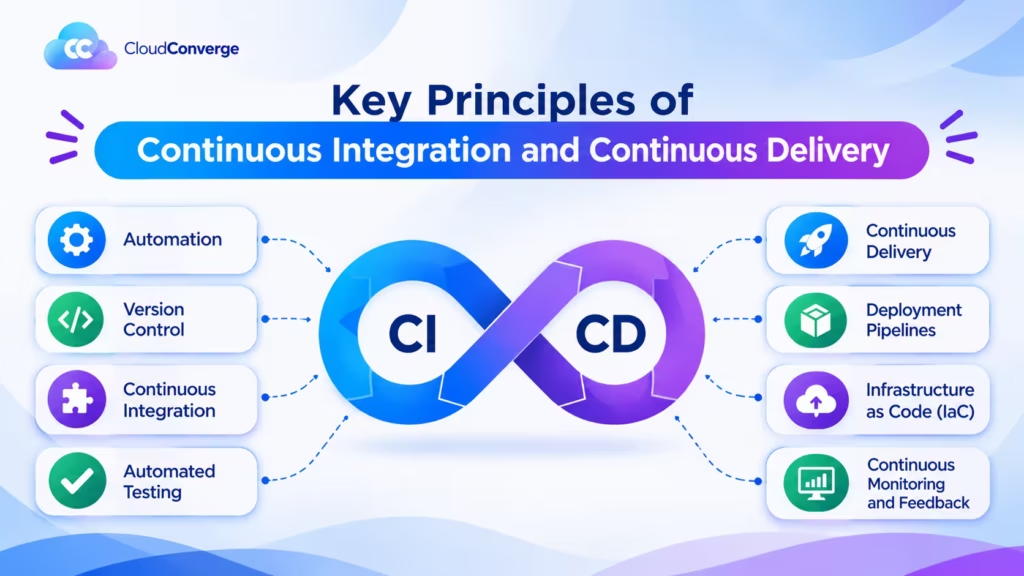
The key principles behind Continuous Integration and Continuous Delivery as they relate to successful software development projects.
Automation
Automation is the cornerstone of continuous integration and continuous delivery (CI/CD). This approach automates all aspects of the software delivery pipeline, from code compilation through Deployment. By automating building, testing, and deployment tasks, teams can reduce manual errors while saving valuable time and effort and create quicker feedback loops enabling developers to identify issues early in development processes and address them faster.
Version Control
Git provides an effective means of versioning source code, tracking any changes made and enabling developers to collaborate more efficiently and revert back to prior versions if necessary. Version control enables better team collaboration, branch management, and code review processes, ensuring the codebase always remains deployable.
Continuous Integration
Continuous Integration is regularly merging code changes into a shared repository. Developers integrate daily changes to ensure the codebase remains up-to-date and compatible with other changes. Each Integration initiates an automated build process that compiles Code, runs tests, and checks for any build or test failures helping identify integration issues early while guaranteeing the codebase’s stability that allows further development.
Automated Testing
Automated testing is a core element of Continuous Integration/Continuous Delivery (CI/CD). It involves creating a suite of automated tests to evaluate both functionality and quality in software products, with tests such as unit, Integration, and end-to-end being executed as part of the CI/CD pipeline these provide instantaneous feedback on code changes that allow developers to catch bugs early as part of continuous Delivery and reduce regression risk while increasing confidence in what you deliver to users.
Continuous Delivery
Continuous Delivery expands on the benefits of Continuous Integration by automating software deployment to production like environments. Under Continuous Delivery, every code change that passes automated tests is ready to be deployed at any time, enabling teams to release software incrementally over time, thereby speeding time-to-market and decreasing risk associated with large releases. Continuous Delivery emphasizes using deployment automation tools for consistency and repeatability across environments.
Deployment Pipelines
Deployment pipelines offer a structured method for delivering software changes through various stages, including development, testing, staging, and production. A deployment pipeline consists of automated steps that take Code from version control into the production ready state; every step in this pipeline such as building, testing and deploying can be customized based on project requirements to speed up the delivery process while visualizing the flow of changes and detecting bottlenecks or issues along the way.
Infrastructure as Code (IaC)
Infrastructure as Code is the practice of provisioning infrastructure resources using Code. When applied in CI and CD environments, IaC allows teams to define and automate the creation of components like servers, networks, and databases as well as version track changes quickly and consistently across environments such as development, testing and production environments in a consistent fashion across time. By treating infrastructure as Code, teams can quickly and consistently version track changes while quickly provision environments and ensuring development, testing and production environments match perfectly with one another increasing reproducibility, scalability and reliability throughout an entire CI/CD pipeline.
Continuous Monitoring and Feedback
Continuous Monitoring and Feedback are integral parts of software deployment success. Monitoring tools gather metrics, logs, and relevant data from production environments providing insights into behavior, performance and potential issues within an application’s code base. Continuous monitoring also allows teams to detect problems quickly with faster resolution times for better customer experiences and drive continuous development processes through feedback loops from monitoring.
Developing an Effective CI/CD Strategy for Agile Development
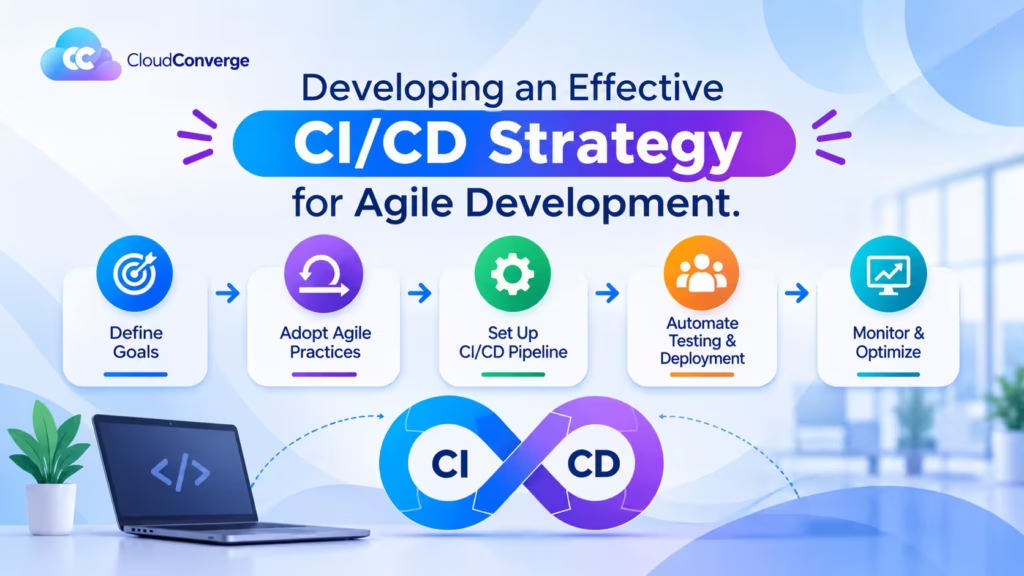
Agile development enables teams to quickly produce high quality software within shorter development cycles, speeding time-to-market and improving customer satisfaction. However, to reap all of its potential advantages, it is vitally important that an effective Continuous Integration and Deployment (CI/CD) strategy be put in place; here, we explore key points when formulating such an approach for agile development projects.
Automated Testing
A cornerstone of agile development is to rapidly deliver working software. Automated testing plays a pivotal role in meeting this objective; by setting up a comprehensive suite of automated unit, Integration, and end-to-end tests, code changes can be validated quickly and accurately before being made life. By automating testing processes early in development cycles, teams can identify issues earlier, reducing the chance of bugs or regressions entering their codebases.
Continuous Integration
Continuous Integration (CI) is a practice where developers merge their code changes frequently into a shared repository, enabling teams to quickly identify integration issues by automatically building and testing each code change as it arrives. An effective CI strategy includes setting up a reliable build pipeline with code compilation, automated testing, static code analysis, etcetera, for optimal CI implementation. By regularly merging code changes, teams can quickly detect conflicts or inconsistencies to maintain a safe codebase with minimal downtime and disruptions.
Continuous Deployment
Continuous Deployment takes continuous integration a step further by automating application deployment into production or production like environments following successful Integration and testing. This approach allows organizations to rapidly deliver new features, bug fixes and improvements directly to end users while having proper checks in place to ensure its quality and stability automated deployment scripts, canary deployments and A/B testing are key ways of mitigating risks associated with continuous deployments.
Infrastructure as Code
Infrastructure as Code (IaC) is essential to an effective Continuous Integration/Continuous Deployment strategy by codifying infrastructure resources like servers, networks, and databases into code files that organizations can manage with version control systems like Terraform or AWS CloudFormation to achieve consistent and repeatable deployments. IaC also fosters collaboration between development and operations teams while providing reliable infrastructure management throughout the CI/CD pipeline.
Monitoring and Feedback
Continuous monitoring and feedback are vital to evaluating the success of any CI/CD strategy and identifying areas for improvement. Implementing monitoring tools and processes enables teams to collect and analyze metrics related to code quality, performance and user experience providing teams with valuable feedback loops which allow them to detect bottlenecks, performance issues or usability problems, which allow iterative enhancement of their pipeline iteratively.
Who Guards the Pipeline?
Here’s the awkward truth about automation: the pipeline that ships your code could just as easily ship someone else’s. Once it holds production credentials, it deserves the same protection as production itself. That’s exactly how the UK’s National Cyber Security Centre frames it in its secure development and deployment guidance.
In a small team that boils down to four habits. Secrets sit in a vault, never in the repository, and test and production run under different roles. Edits to the pipeline’s own configuration get a second reviewer, exactly as application code does. Static analysis and dependency scans are allowed to block a release. And a human approval stays in front of production until the automated checks have proved themselves, because NCSC rates fully automated deployment without adequate controls as high risk.
Personal data brings one more rule. Article 25 of UK GDPR requires data protection by design and by default, and the ICO’s privacy in the product design lifecycle guidance explains what that means for technical teams. In pipeline terms it’s simple: real customer records never land in a test environment unmasked.
Culture and Collaboration
Establishing an effective CI/CD strategy requires creating an environment of cooperation and continuous improvement. Encouraging cross functional teams composed of developers, testers, operations personnel, and other stakeholders works together. It promotes knowledge sharing and collective ownership of the process. Regular retrospectives and feedback sessions enable teams to assess their processes and identify areas for optimization while creating an open environment that encourages experimentation and learning, which is key for driving continuous improvement within any CI/CD strategy.
Building the Pipeline Without Freezing the Roadmap
The quickest way to stall is to automate everything in one go. A gentler order keeps features flowing while the pipeline takes shape around them.
Begin with a whiteboard, not a tool. Trace every hand off from merged code to live service and note how long work sits idle at each one. DORA recommends this mapping as the opening move for any improvement (DORA), and the queues usually turn out to cost more than the tasks.
Next, shrink your branches. Code that lives on a side branch for a fortnight will collide with everything else on the day it merges, so aim to merge within a day or two.
With small merges flowing, automate the build and the fastest tests. A developer who hears about a broken test the same morning fixes it while the code is still fresh in their mind.
Then script one environment from top to bottom. Staging defined as infrastructure as code stays identical to production, whereas hand built servers drift apart, and drift sits behind most “it worked on staging” surprises.
Add the safety nets after that: feature flags, so half built work can ship switched off, and a rollback that takes a single command.
Last of all, step back. Your own developers run the releases, and someone records the five delivery figures in the next section each month.
Implementing CICD Pipelines and Tools
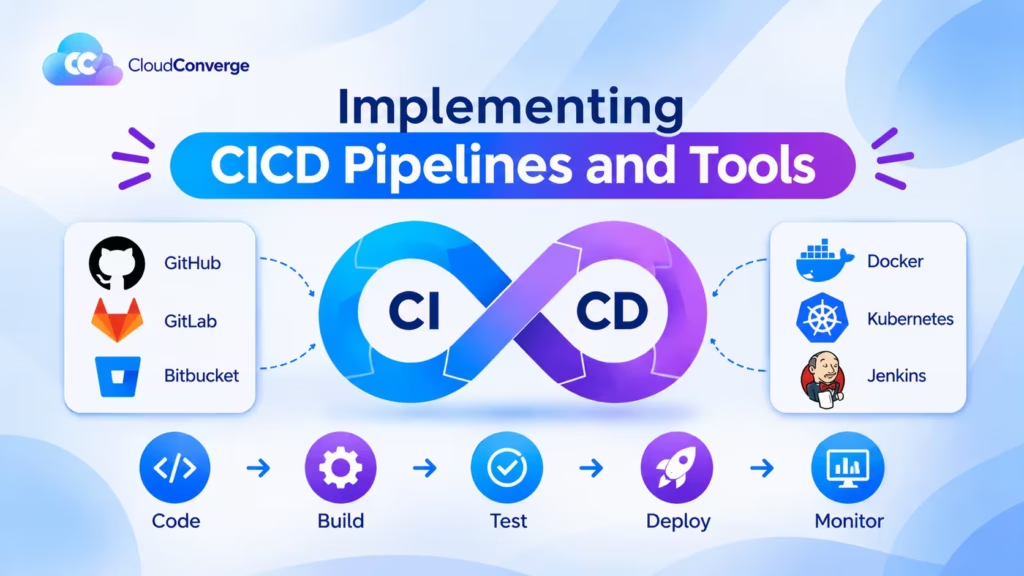
Continuous integration/deployment pipelines and tools can significantly streamline development workflow and enhance overall software quality. In this article, we will look at key points to remember when setting up such pipelines and the essential tools available to facilitate this process.
Planning and Designing the CI/CD Pipeline
- Understand Software Development Workflow:Before designing or implementing a CI/CD pipeline, one must gain an in depth knowledge of software development workflow, including all stages and their respective dependencies.
- Define Pipeline Stages:Define each stage in your pipeline, such as code compilation, unit testing, integration testing and deployment. Each should serve its specific purpose of improving software quality and stability.
- Automate the pipeline:Automation is key in any CI/CD pipeline; determine which tools and technologies will enable automation at every step, from code commits to production deployment.
Version Control and Collaboration
- Implement a Version Control System:Adopting Git as your version control system of choice can help teams collaborate efficiently on code development by tracking changes, managing branches, and merging code seamlessly.
- Branching Strategy:Establish a branching strategy that fits your development process. Common options include feature branching, git flow and trunk based development select one that promotes parallel development while assuring code stability.
- Code Reviews:Implement code review practices into the ci pipeline to ensure code quality and identify potential issues early. Tools such as GitHub pull requests, or GitLab merge requests can facilitate this collaborative effort.
Building and Testing
- Build Automation:Jenkins, Travis CI or CircleCI build automation tools provide consistent build processes across different environments by automating the compilation and packaging of the software. This ensures a repeatable and repeatable build experience.
- Unit Testing:Implement a thorough unit testing framework such as JUnit for Java or pytest for Python to validate the functionality of individual components and monitor them automatically during development, helping identify and resolve bugs early.
- Integration Testing:Conduct integration tests to examine how components interact. Tools like Selenium or Cypress may be helpful when testing web applications; Postman or REST Assured can be utilized for API testing.
Continuous Deployment and Delivery
- Artifact Management:Utilize an artifact repository such as Nexus or Artifactory to store and manage build artifacts for easier deployment of specific software versions. This ensures traceability while simplifying the deployment of certain versions.
- Infrastructure as Code (IaC):Take advantage of IaC practices using tools like Terraform or AWS CloudFormation to provision and manage required infrastructure resources in an organized fashion, allowing changes to be versioned and tested alongside your application code.
- Deployment Automation:Use tools like Ansible, Puppet and Kubernetes to consistently deploy applications across different environments. Infrastructure and application configurations can be stored as code and automatically deployed upon demand.
- Continuous Monitoring:Integrate monitoring and logging solutions into the CI/CD pipeline to gain visibility into an app’s health and performance. Tools like Prometheus, ELK Stack or Datadog can provide real-time insight to detect issues quickly.
Security and Quality Assurance
- Static Code Analysis:Incorporating static code analysis tools like SonarQube or ESLint into the development pipeline will allow developers to quickly detect quality issues, security vulnerabilities, and code standards compliance throughout their development processes this way, assuring high code quality development processes.
- Security Testing:Conduct security testing on applications using vulnerability scanning and penetration testing tools such as OWASP ZAP or Nessus to identify and address security weaknesses. Automating security testing through these tools may also save time and resources when uncovering security weaknesses within software programs.
- Provide Continuous Feedback:Establish mechanisms that provide constant feedback to the development team, such as automated test reports, code quality metrics and security scan results. This loop enables developers to address issues promptly while iteratively improving the software.
Understanding the Benefits of Automating Software Delivery
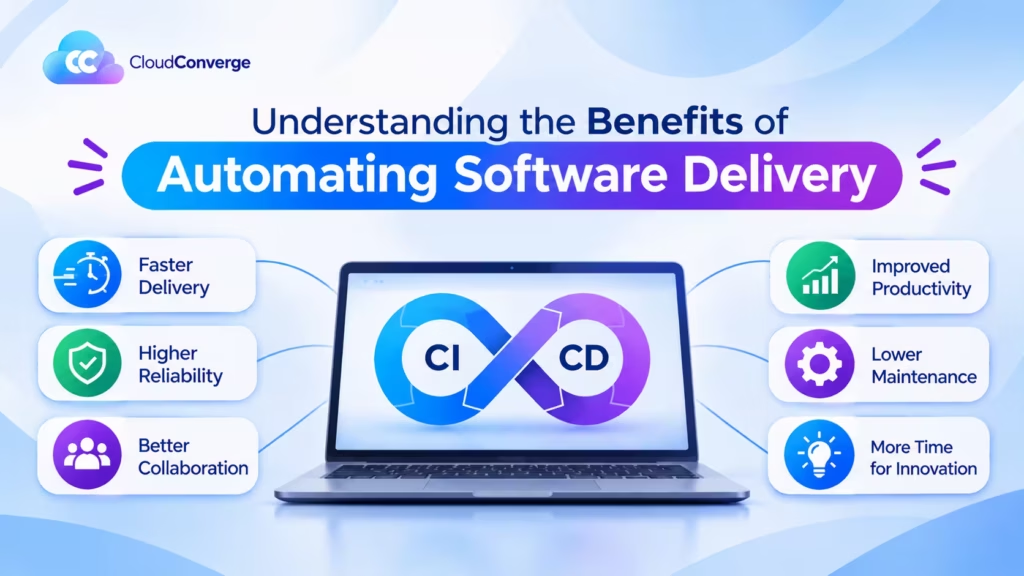
Automation brings many advantages to organizations, helping streamline workflows, increase productivity and boost overall efficiency. Here, we explore some key points about automating software delivery that can help your organization reap these rewards.
Faster and More Reliable Releases
One of the primary advantages of automating software delivery is faster and more reliable software releases. Manual deployment processes often involve human errors or delays that slow release cycles and compromise reliability; by contrast, automated workflows and scripts eliminate manual intervention, ensuring consistent and error free deployments that speed time to market and ensure organizations can deliver new features and bug fixes more swiftly and with greater confidence.
Continuous Integration and Deployment
Automated Software Delivery Automation has enabled organizations to adopt Continuous Integration and Deployment (CI/CD) practices seamlessly, as this practice ensures code changes can be integrated and deployed into software in small, frequent increments. Automation tools such as Jenkins, Travis CI, and GitLab can be utilized to automatically build, test, and deploy changes from software changes into production quickly, streamlining development while continuously updating software versions speeding up production while helping identify and address any potential issues earlier on in its lifespan.
Automated Software Delivery Enhances Team Collaboration and Efficiency
Automated software delivery fosters better collaboration and team efficiency by automating repetitive tasks, such as code compilation, testing, and deployment, so developers can focus on more value adding activities like coding or innovation leading to increased productivity while teams collaborate more efficiently. Automation provides a standardized environment where team members can easily share code and track changes; also, automation tools often offer real time visibility into development and delivery processes to identify bottlenecks or optimize workflows.
Enhanced Quality Assurance
Automation plays a pivotal role in improving software quality assurance (QA). Testing frameworks like Selenium, Appium and JUnit can be integrated into delivery pipelines to run an extensive set of tests, including unit tests, integration tests and regression tests, automatically without human intervention helping organizations quickly identify and fix bugs without manual intervention saving both time and money while increasing overall quality and user experience.
Scalability and Flexibility
Automation allows organizations to efficiently increase the efficiency and flexibility of their software delivery processes. As software development lifecycles become more complex, manual processes become harder to manage; by automating tasks instead, organizations can easily manage large scale deployments, support multiple environments seamlessly, and adapt their processes according to changing business needs more easily. Furthermore, automation allows organizations to customize workflows according to unique requirements ensuring the software delivery process reflects each organization’s unique goals and needs.
Automated Software Delivery Can Enhance Security and Compliance
Automated software delivery can significantly boost security and compliance practices for organizations. By including security testing and vulnerability scanning as part of their deployment pipeline, organizations can proactively identify security issues before they arise, while automating software delivery can enforce compliance standards by creating consistent processes and documentation throughout development and deployment cycles particularly crucial in industries with stringent regulatory requirements, like healthcare and finance where noncompliance could have severe repercussions.
Cost and Time Savings
Automation ultimately saves organizations costs and time through reduced manual effort and fewer human errors, improving operational efficiency and decreasing costly mistakes. Automated software delivery also enables organizations to allocate their resources more effectively as developers can focus on strategic initiatives rather than mundane, repetitive tasks; furthermore, automation speeds up release processes without unnecessarily delaying market opportunities quickly.
Five Monthly Questions That Show Whether It’s Working
Faster, safer, cheaper: every pipeline project promises all three. Google Cloud’s DORA research programme gives you a way to check, through five measures (DORA). You don’t need a dashboard to start. You need someone willing to ask five plain questions every month.
- How long does a merged change take to reach customers? (change lead time)
- How many times did we deploy this month? (deployment frequency)
- When a release broke something, how fast were we back to normal? (failed deployment recovery time)
- What share of releases needed a rollback or an urgent fix? (change fail rate)
- How many deployments were unplanned, forced on us by a live incident? (deployment rework rate)
DORA files the first three under throughput and the last two under instability, and its research finds the two groups improve together rather than trading off. If speed rises while the fail rate climbs, the job isn’t finished.
Watch for two traps: Turning a number into a target (“daily deploys by December”) invites people to game it. And comparing your mobile app with your ERP integration tells you nothing, so measure each service against its own past. Write the answers down before any work starts, then ask your consultant to report the same five at handover.
Best Practices for Version Control and Code Repository Management
Implementing the best version control and code repository management practices can greatly enhance the development process and ensure an uninterrupted workflow. Here are a few key points to remember:
Use a Version Control System (VCS)
Use an efficient version control system such as Git, Mercurial or Subversion that provides essential functionalities like branching, merging and history tracking. Git stands out among these VCSs by offering distributed collaboration, speed and flexibility three qualities many organizations prize in an ideal VCS solution.
Organize Your Repository:
- For the optimal organization of your code repository, consider organizing it logically and modularly.
- Group your codebase into meaningful directories and modules to simplify navigation and file identification.
- Establish an aligned folder structure that complements the architecture of your project.
Create Meaningful Commit Messages
When committing changes to the repository, provide clear and concise commit messages that explain why changes were made this helps others understand the purpose of each commit without needing to delve further into code changes.
Branching Strategy
Choose a branching strategy that best fits your development workflow. Common examples are GitFlow workflows, where branches exist for feature development, bug fixes, releases, and hotfixes. Utilize feature branches when undertaking new development activities, while each branch must serve a distinct purpose.
Pull Requests and Code Reviews
Before merging code into the main branch, consider employing pull requests as an opportunity for code review allowing changes to be thoroughly examined for quality, consistency, and compliance with coding standards. Reviews promote collaboration while helping identify early bugs while maintaining an excellent codebase.
Integrate Your Version Control System and Automated Testing
Integrating your version control system with a continuous integration (CI) tool such as Jenkins or Travis CI allows automated builds, tests, and deployments when changes are pushed to your repository. Automated testing helps identify bugs early in development cycles to create a more stable codebase.
Tagging and Release Management
Implement a tagging strategy to mark your codebase’s significant milestones, releases, or versions. Tags provide a snapshot of where the code was at any particular moment so you can refer back to specific versions when needed. With proper release management, code can be deployed safely into production environments without fear of instability or breakage.
Documentation and Readme Files
Ensure that your code repository includes detailed documentation and readme files to aid developers in understanding how to use the code, its purpose, and any dependencies or requirements that it might entail, and provide contributors with guidance regarding project structure, setup instructions, and any important guidelines.
Backup and Disaster Recovery
Regular backups should be performed on your code repository to protect against data loss in case of hardware failure, accidental deletions or any other unavoidable disasters. A disaster recovery plan should also be in place, so your repository can be quickly restored in emergencies.
Regular Maintenance and Clean up
Perform regular maintenance tasks to keep your repository tidy. Remove unnecessary files and branches, promptly resolve merge conflicts, review dependencies regularly, and regularly review them to improve their performance and readability. Such efforts help enhance both its readability and overall performance.
Before You Sign: Budget Surprises and Vendor Answers
Pipeline tooling is usually the smallest line on the invoice. The surprises hide elsewhere. Writing tests for a codebase that has few of them tends to outweigh configuring the pipeline itself. Hosted CI services charge for build minutes, and running tests in parallel buys speed at a price. A staging copy of production adds to the hosting bill unless it switches off when idle. And your developers need real hours to pair with the consultant during handover, not an afternoon of watching.
When you speak to vendors, Cloud Converge included, listen to how they answer as much as what they say:
| Ask the vendor | A reassuring answer | A warning sign |
| Can we run the pipeline without you? | Standard, documented tools your team used during the build | Custom scripts only their engineers understand |
| Who owns the code, credentials and cloud accounts at the end? | You do, from day one | Accounts registered in the vendor’s name |
| How will you avoid freezing our releases? | Changes brought in service by service, alongside normal work | A plan to pause releases during the migration |
| What will you report at handover? | Before and after figures for the five DORA measures | General claims about speed |
| How do you protect secrets and pipeline changes? | Vault stored secrets, reviewed pipeline edits, a named certification such as ISO 27001 | Credentials passed around by email or chat |
| What happens after go live? | A defined support option with stated commercial terms | A vague promise to be around |
Where to Go from Here
Agile methodologies have revolutionized software development and delivery, enabling teams to respond rapidly to changing customer requirements while quickly providing value in shorter cycles. But to fully harness its power, organizations need to embrace automated software delivery. This conclusion highlights its advantages as an enabler of Agile development and its potential to drive innovation and success.
Automated software delivery provides numerous benefits for Agile teams. First and foremost, it accelerates release cycles by eliminating manual, time consuming tasks and reducing human error risk. Automated testing, continuous integration pipeline and deployment allow software changes to be quickly validated and deployed to production, allowing faster feedback loops and more frequent releases.
Automated software delivery enhances collaboration and transparency within Agile teams. By automating build, test, and deployment processes, everyone on the team can access the most up to date version of the software, improving communication and alignment. Furthermore, automated tracking and reporting mechanisms give stakeholders real time insight into development progress, allowing them to make informed decisions and prioritize work efficiently.
Automated software delivery offers another significant advantage improving quality and reliability. Automating testing processes such as unit tests, integration tests, regression tests and deployment practices that ensure consistency across environments while minimizing configuration errors and downtime for system upgrades can identify potential issues early in development cycles resulting in higher quality software. Automated deployment ensures consistency across environments by eliminating configuration errors, reducing system downtime and increasing quality products and systems uptime.
Automated software delivery enables organizations to embrace a culture of continuous improvement. By automating repetitive tasks, developers can concentrate on innovation, experimentation and user experiences rather than tedious, repetitive tasks. Furthermore, automated monitoring and feedback mechanisms provide valuable insight into system performance so teams can proactively address bottlenecks or scaling issues before they arise.
Your Questions on Agile Continuous Delivery, Answered
We only have five developers. Is this overkill?
Not if customers use your product every week. A small team is exactly where manual release days hurt most, because nobody can be spared for one. Begin modestly: an automated build, unit tests, a single staging environment and a manual go live button.
What will a CI/CD consulting project cost us?
That comes down to three things: how many applications are in scope, how much test automation already exists, and the engagement model you pick. Cloud Converge gives a quote after a free consultation and audit, on fixed price, dedicated team, agile or hourly terms.
Do we have to drop Scrum for Kanban?
No. Continuous delivery governs how code reaches production, while Scrum and Kanban govern how work gets planned, so either framework works. Many Scrum teams notice their sprint reviews start showing features customers already have.
When will we notice a difference?
Any vendor naming a date before auditing your codebase is guessing, because size and test coverage drive the timeline. The first tangible change arrives when builds and tests run on every merge, and that step comes early in the plan, not at the end.
Our main system is old. Can it still benefit?
It can, starting small. Jez Humble, co author of the original Continuous Delivery book, tackles this objection in ACM Queue and points to firmware work at HP. Automate the build first and wrap the riskiest code in tests before touching deployment.
Who keeps the pipeline healthy after the consultant leaves?
Ideally your own developers, which is why training and a written handover belong in scope. If you’re short of people, Cloud Converge’s managed CI/CD service can take on routine upkeep while your team keeps ownership of the code.